
Testing Pantheon Autopilot: A Safer Path to Automated WordPress Updates
Automating WordPress Core and plugin updates has long been one of those ideas that sounds great in theory—but makes seasoned WordPress developers nervous in practice. Broken layouts, unexpected plugin conflicts, and subtle regressions have trained most of us to keep automatic updates turned off in the WordPress dashboard and instead rely on manual testing and staged deployments.
At hale.group, we’ve historically followed that same cautious approach.
That’s why we were intrigued by Pantheon Autopilot—a third-party service designed specifically to automate WordPress updates safely, using controlled environments, visual regression testing, and Pantheon’s Multidev workflow. This post documents what Autopilot is, how it works, why it’s fundamentally different from native WordPress auto-updates, and what we’ve learned so far by running it on our own site, hale.group.
Why WordPress Developers Avoid Native Auto-Updates
Before diving into Autopilot, it’s important to acknowledge why automated updates have such a bad reputation in the WordPress ecosystem.
The built-in WordPress auto-update feature:
-
Runs directly on the live site
-
Has no staging or rollback context
-
Does not test plugin interactions
-
Has no visual validation
-
Can quietly break layouts, JavaScript, or functionality
For agencies and serious site owners, this is unacceptable risk. A plugin update that breaks a checkout flow or homepage layout—even briefly—can have real business consequences.
As a result, most professional teams:
-
Disable native auto-updates
-
Update manually on dev or staging
-
Perform visual and functional checks
-
Deploy intentionally
Autopilot aims to preserve this discipline—while dramatically reducing the hands-on effort.
What Pantheon Autopilot Is (and How It’s Different)
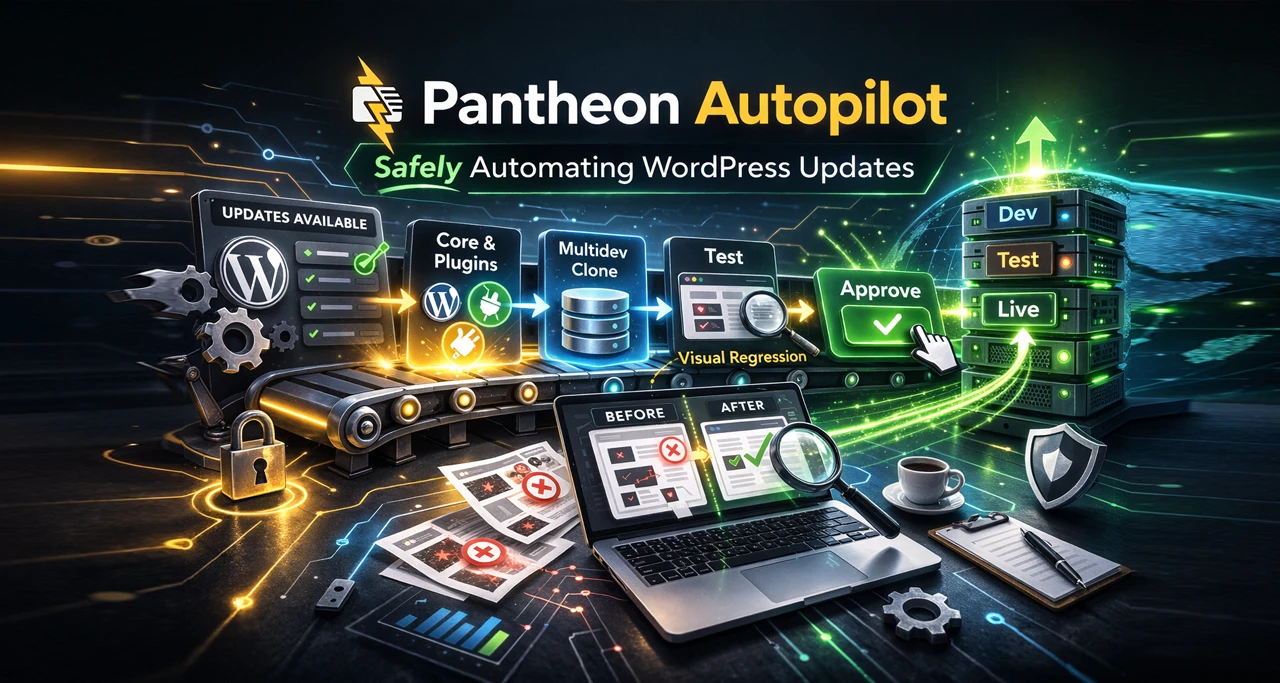
Pantheon Autopilot is not a WordPress feature—it’s a WebOps automation service built into Pantheon’s platform.
At a high level, Autopilot:
-
Detects available WordPress Core and plugin updates
-
Spins up its own Multidev clone
-
Applies updates only in that isolated environment
-
Runs automated visual regression testing
-
Compares before/after screenshots
-
Decides whether to deploy automatically—or request approval
This is a crucial distinction.
Unlike WordPress auto-updates, Autopilot:
-
Never updates live blindly
-
Never skips testing
-
Always works from a disposable clone
-
Uses Pantheon’s proven Dev → Test → Live workflow
-
Supports manual approval at multiple stages
In other words, it behaves much more like a careful developer than a background cron job.
Our Initial Setup Experience
We’ll be candid: the initial setup was not entirely smooth.
We configured Autopilot correctly, but unfortunately did so during a period when Pantheon was actively addressing a known bug. To their credit, the Pantheon team worked directly with us, communicated clearly, and resolved the issue promptly.
Once that bug was squashed, Autopilot behaved consistently and predictably.
Running Autopilot on hale.group
We’re now running Autopilot on hale.group itself—the very site you’re reading this post on. That means we’re trusting it not just in theory, but in production.
Here’s what we’ve observed so far.
The Good
-
Updates are detected reliably
-
Multidev clones are created automatically
-
Updates apply cleanly in the clone
-
The Dev → Test → Live pipeline works as expected
-
Rollback safety is inherent in the workflow
-
The system absolutely saves time
The Annoying Caveat: Visual Regression Failures
Every single update cycle so far has failed automated visual regression testing.
At first glance, this sounds alarming—but context matters.
What’s actually happening:
-
Autopilot’s screenshot-based comparisons frequently report failures
-
The failure happens before anything touches Dev, Test, or Live
-
We receive an email and dashboard alert
-
We manually review the Multidev clone
-
The site always looks perfect
-
No real regressions are present
When we inspect Autopilot’s generated screenshots, we often see:
-
Missing UI elements
-
Incomplete page renders
-
Visual artifacts that do not exist in the actual clone
In short, Autopilot’s perception of the site is flawed—but the site itself is not.
Our Current Workflow (and Why It Still Works)
Because Autopilot fails visual regression, we currently:
-
Receive an alert
-
Click into the Multidev clone
-
Perform a quick visual scan
-
Click Approve
-
Let Autopilot deploy through Dev, Test, and Live
This takes minutes—not hours—and is still far safer than manual updates across multiple environments.
It’s also worth noting:
-
Autopilot can be configured not to auto-deploy to Live
-
Teams can require explicit approval at each stage
-
We’ve chosen to test fully automated deployment, including Live
So far, results have been excellent.
Our Take So Far
Autopilot delivers on its core promise:
-
Safer automation
-
Massive time savings
-
Proper environment isolation
-
Real deployment discipline
The one weak point is visual regression accuracy.
Right now, it feels like Autopilot is overly cautious due to unreliable screenshot data. The irony is that this makes the system less autonomous than it could be—but not less safe.
Feedback for the Autopilot Team
We’re sharing this experience openly because we believe Autopilot is already a strong product—and could be even better.
If the visual regression engine:
-
Rendered pages more reliably
-
Waited for full hydration / JS execution
-
Handled dynamic content more gracefully
…then Autopilot could truly become a “set it and forget it” solution for many professional WordPress teams.
We hope this feedback helps the Autopilot team refine an already valuable tool.
Final Thoughts
Automated WordPress updates will always require trust.
Pantheon Autopilot doesn’t ask you to trust blindly—it earns trust through isolation, testing, and transparency. Even with its current quirks, it represents a meaningful evolution in how WordPress maintenance can be handled safely at scale.
We’ll continue running Autopilot on hale.group, and we’ll continue sharing real-world results as the platform evolves.
If you’re curious about adopting Autopilot—or want to discuss safe WordPress automation strategies—feel free to reach out or connect with us on LinkedIn.
About the Author


Automating WordPress Core and plugin updates has long been one of those ideas that sounds great in theory—but makes seasoned WordPress developers nervous in practice. Broken layouts, unexpected plugin conflicts, and subtle regressions have trained most of us to keep automatic updates turned off in the WordPress dashboard and instead rely on manual testing and staged deployments.
At hale.group, we’ve historically followed that same cautious approach.
That’s why we were intrigued by Pantheon Autopilot—a third-party service designed specifically to automate WordPress updates safely, using controlled environments, visual regression testing, and Pantheon’s Multidev workflow. This post documents what Autopilot is, how it works, why it’s fundamentally different from native WordPress auto-updates, and what we’ve learned so far by running it on our own site, hale.group.
Why WordPress Developers Avoid Native Auto-Updates
Before diving into Autopilot, it’s important to acknowledge why automated updates have such a bad reputation in the WordPress ecosystem.
The built-in WordPress auto-update feature:
-
Runs directly on the live site
-
Has no staging or rollback context
-
Does not test plugin interactions
-
Has no visual validation
-
Can quietly break layouts, JavaScript, or functionality
For agencies and serious site owners, this is unacceptable risk. A plugin update that breaks a checkout flow or homepage layout—even briefly—can have real business consequences.
As a result, most professional teams:
-
Disable native auto-updates
-
Update manually on dev or staging
-
Perform visual and functional checks
-
Deploy intentionally
Autopilot aims to preserve this discipline—while dramatically reducing the hands-on effort.
What Pantheon Autopilot Is (and How It’s Different)
Pantheon Autopilot is not a WordPress feature—it’s a WebOps automation service built into Pantheon’s platform.
At a high level, Autopilot:
-
Detects available WordPress Core and plugin updates
-
Spins up its own Multidev clone
-
Applies updates only in that isolated environment
-
Runs automated visual regression testing
-
Compares before/after screenshots
-
Decides whether to deploy automatically—or request approval
This is a crucial distinction.
Unlike WordPress auto-updates, Autopilot:
-
Never updates live blindly
-
Never skips testing
-
Always works from a disposable clone
-
Uses Pantheon’s proven Dev → Test → Live workflow
-
Supports manual approval at multiple stages
In other words, it behaves much more like a careful developer than a background cron job.
Our Initial Setup Experience
We’ll be candid: the initial setup was not entirely smooth.
We configured Autopilot correctly, but unfortunately did so during a period when Pantheon was actively addressing a known bug. To their credit, the Pantheon team worked directly with us, communicated clearly, and resolved the issue promptly.
Once that bug was squashed, Autopilot behaved consistently and predictably.
Running Autopilot on hale.group
We’re now running Autopilot on hale.group itself—the very site you’re reading this post on. That means we’re trusting it not just in theory, but in production.
Here’s what we’ve observed so far.
The Good
-
Updates are detected reliably
-
Multidev clones are created automatically
-
Updates apply cleanly in the clone
-
The Dev → Test → Live pipeline works as expected
-
Rollback safety is inherent in the workflow
-
The system absolutely saves time
The Annoying Caveat: Visual Regression Failures
Every single update cycle so far has failed automated visual regression testing.
At first glance, this sounds alarming—but context matters.
What’s actually happening:
-
Autopilot’s screenshot-based comparisons frequently report failures
-
The failure happens before anything touches Dev, Test, or Live
-
We receive an email and dashboard alert
-
We manually review the Multidev clone
-
The site always looks perfect
-
No real regressions are present
When we inspect Autopilot’s generated screenshots, we often see:
-
Missing UI elements
-
Incomplete page renders
-
Visual artifacts that do not exist in the actual clone
In short, Autopilot’s perception of the site is flawed—but the site itself is not.
Our Current Workflow (and Why It Still Works)
Because Autopilot fails visual regression, we currently:
-
Receive an alert
-
Click into the Multidev clone
-
Perform a quick visual scan
-
Click Approve
-
Let Autopilot deploy through Dev, Test, and Live
This takes minutes—not hours—and is still far safer than manual updates across multiple environments.
It’s also worth noting:
-
Autopilot can be configured not to auto-deploy to Live
-
Teams can require explicit approval at each stage
-
We’ve chosen to test fully automated deployment, including Live
So far, results have been excellent.
Our Take So Far
Autopilot delivers on its core promise:
-
Safer automation
-
Massive time savings
-
Proper environment isolation
-
Real deployment discipline
The one weak point is visual regression accuracy.
Right now, it feels like Autopilot is overly cautious due to unreliable screenshot data. The irony is that this makes the system less autonomous than it could be—but not less safe.
Feedback for the Autopilot Team
We’re sharing this experience openly because we believe Autopilot is already a strong product—and could be even better.
If the visual regression engine:
-
Rendered pages more reliably
-
Waited for full hydration / JS execution
-
Handled dynamic content more gracefully
…then Autopilot could truly become a “set it and forget it” solution for many professional WordPress teams.
We hope this feedback helps the Autopilot team refine an already valuable tool.
Final Thoughts
Automated WordPress updates will always require trust.
Pantheon Autopilot doesn’t ask you to trust blindly—it earns trust through isolation, testing, and transparency. Even with its current quirks, it represents a meaningful evolution in how WordPress maintenance can be handled safely at scale.
We’ll continue running Autopilot on hale.group, and we’ll continue sharing real-world results as the platform evolves.
If you’re curious about adopting Autopilot—or want to discuss safe WordPress automation strategies—feel free to reach out or connect with us on LinkedIn.
About the Author